scribu - propria subcultură

Besides the built-in template tag, custom_field_image(), now we have the [cfi] shortcode, which means that not only can you put the image anywhere in the layout, but anywhere in the post content, too.

Other Features

Easy install: theme code editing required only for advanced use.

Bulk management: import, export and delete images in one click.

Simple management box under the post editing screen:
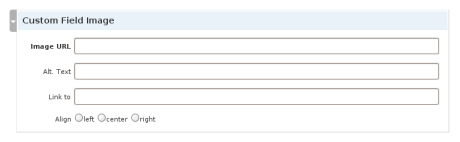
Custom Field Images management box

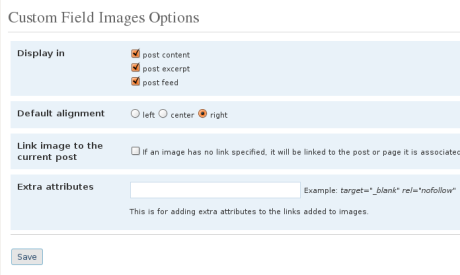
Settings page:
Custom Field Images Options Page

Version history

  • 1.6: added shortcode; duplicate alt. text as title
  • 1.5: import / export functionality; option to automatically link to associated post
  • 1.4: extra attributes for image link
  • 1.3: one field per image instead of 4
  • 1.2: general improvements
  • 1.1: added page support
  • 1.0: initial release

Reacţii (4)

Comentarii (52)

  • C.T.Daniel says:

    niste screenshot-uri sa vedem cum arata pus in aplicare?

  • scribu says:

    Păi, poţi să te uiţi la imaginile de la începutul posturilor de pe acest blog.

    Asta nu înseamnă că imaginile vor avea un chenar negru, ci doar că vor fi aliniate conform opţiunii selectate.

  • Monika says:

    Hi thanks a lot for this plugin. It simplyflied to habe a image over a post for so many users.

    Img tag without width and height is not good. First not valid, second some versions of IE do’nt show images correct without width and height or need many times to calculate the width and height.

    Is it possible to add this two fields?

    kindly regards
    Monika

  • scribu says:

    Thanks for your comment, Monika. I’ll look into it.

  • wolly says:

    Thanx for this plugin.
    I have a little problem.
    Wordpress 2.5.1
    I have in home.php the_excerpt
    In index.php the_content
    If I uncheck the_content no images is displayed both in home.php and
    If I uncheck the_excerpt in home.php (where I have the_excerpt) no image is showed instead it’s showed in index.php
    If I leave all checked I have image in home.php and in index.php

    ciao
    wolly

  • wolly says:

    I solved the problem unchecking everything and putting the code custom_field_image() in home.php

    ciao
    wolly

  • baron says:

    hi. Thanks for plugin

    perfect.

    Regards

  • Jane says:

    I am getting a strange error message everytime I try and activate another plugin. Any ideas?

    Warning: Cannot modify header information – headers already sent by (output started at /home/mydomain/public_html/affiliate/wp-content/plugins/custom-field-images/custom-field-images.php:317) in /home/mydomain/public_html/affiliate/wp-includes/pluggable.php on line 694

  • scribu says:

    Jane, please give me more info: version of the plugin, version of Wordpress and of PHP (if you can find out).

  • Jane says:

    Hi, the plugin version is the one that I downloaded from your site (I have since deleted it sorry), PHP 4, wordpress 2.5.1

    Thanks

  • Jane says:

    I downloaded again from wordpress.org and all ok. I guess I must have been using the older version.

    thanks

  • scribu says:

    Yes, I thought that might be it. Happy blogging. :)

  • Zielony says:

    The latest release of CFI has a conflict with NextGEN Gallery plugin. Doesn’t lets display a single pictures in posts.

  • scribu says:

    Please provide more info so I can replicate the problem: WP version, PHP version etc.

  • Zielony says:

    WP version: 2.6
    PHP Version : 5.2.5
    NG Gallery: 0.98

  • Amir says:

    I am in the middle of putting up a website … I am using this plugin and its working fine.

    I just need to open the corresponding link, when clicked on the image, to open in a new window.

    Is there a way I can do that?

  • scribu says:

    You’ll have to edit the plugin file, or use a plugin called Zapp New Window if it is an external link.

  • Amir says:

    Hey, thanks.

    Could you please tell me what changes would I have to make in the plugin file … would truly appreciate it :)

  • Jolidog says:

    I’m also interested in finding out what changed in the last version…
    Maybe mantainig a change log, even if it is inside the plugin file.

  • scribu says:

    I have added a switch in version 1.2.7:

    Just open custom-field-images.php and set $new_window = TRUE in the “Editable Options” section.

  • aronil says:

    Works like a charm man and I’ve also pimped you on my site. If you ever do upgrade will be great to have a section you can adjust the size of the thumbnail images. Thanks again :)

  • scribu says:

    I saw your article – much appreciated. :)

    As for the size adjustment, I think it would be easier to just use max-width in your stylesheet. I think I’ll tweak the plugin so that the images have an extra class, for better control with CSS.

  • Bryson says:

    I just downloaded and installed the new version, and I’d love to see a change log on the site here, but I noticed a problem in how it works.

    I tried to get a post done right with this plugin, and started with left align, then changed it to right align, then changed it to right align, then changed it to right align, etc. etc.

    It never would change it from left to right align, though it changed it from right align, the default, to left align the first time.

    Any ideas why it isn’t allowing me to update the alignment? I am using WP 2.6.1 on php5 and my system is XP SP3, IE8 and Safari 3.1.2

    I used the preview post function to view this error, thought there was a problem with not saving the unpublished post first, so I started saving after trying to change the alignment, and it still didn’t work.

  • scribu says:

    @Bryson: I have managed to reproduce the error and will fix it as soon as possible.

    As for the version history, I’ll try to set it up.

  • Bryson says:

    Wow, appreciate it.

  • Marvelous plugin, great work! Thanks.

  • Rob says:

    Hi

    I just updated to 1.5 and all my custom images are appearing 2 times. Ive deleted the plugin and reinstalled it and the same, all images display on the page and post 2 times. Any idea why?

    Rob

  • scribu says:

    It seems it was a bug with the upgrade. I’ll look into it.

  • Rob says:

    Not really a bug, but it seems to change the settings, so I had to uncheck all the Display in check boxes.

    Rob

  • Rob says:

    Hello, I am experiencing a little trouble using your wonderful plugin, after a few days after installation and after a few days of correct displaying of the images, I have to report that out of the blue today none of the images are in the right places.

    When I go into the back-end part of my WP site and I open one of the article where image is not properly displayed I see on the fields IMAGE URL, ALT TEX and LINKS TO a letter, letter “a” and letter “s” and not the url or the description as I entered originally.
    Believe me I’ve touched anything on the site.
    Did you ever experienced anything like this?

    Thank you
    Rob

  • scribu says:

    Are you sure you didn’t recently update the plugin? What version are you using now, by the way?

    About the “a” and “s”, as noted in Version History, from version 1.3, the fields are condensed into a single entry in the custom fields.

  • Keith says:

    I’ve been using this excellent plugin on a few sites but after the recent WP upgrade to 2.6.2 I’ve been having trouble using it – WordPress has an error: Cannot load custom-field-images.

    Any ideas?

    Thanks

  • scribu says:

    When and where does this message appear? On activation, in your posts?

  • moonswamp says:

    seems don’t work on 2.6.2
    uploaded and actived, but there is no custom box on writting page, also there is no links on setting page.

    why????

  • scribu says:

    Are you sure you have the latest version of the plugin?

  • moonswamp says:

    yes ofcouse, I downloaded from the link on this page!

  • Olaf says:

    I have the same with WP 2.6.3, call wp-admin/options-general.php?page=custom-field-images end with “Cannot load custom-field-images.”

  • Olaf says:

    Good, I have it solved, write self a custom function. Thanks for trying to help.

    For other analyses, no nothing PHP5, server send:
    X-Powered-By: PHP/4.4.9

  • scribu says:

    Could you please email me that custom function? My address is scribu@gmail.com

  • moonswamp says:

    oh, update to the latest version and don’t work now~~~

    after filling the “Custom Field Image” forms and publish the post, the “Image URL” will change to the “LInk to URL”, and the “LInk to URL” will change to blank~~~

  • scribu says:

    Sorry about that. Fixed in 1.5.1.1

  • Dragon says:

    I am using Wordpress as a CMS so I need to severely control that the users can do. I need to restrict them to uploading only one image per post, auto resize and auto place the image on the page. Is that possible? Can you plugin do that?

    • scribu says:

      Well, this plugin doesn’t handle image uploads at all, just their insertion in posts (only one per post).

  • Olaf says:

    Hi scribu,
    please fix your comment-code, you have this:
    a href=”URL’ rel=’external nofollow”

    must be:
    a href=”URL” rel=”external nofollow”

    All your commenters have tons of 404 from GoogleBot in serverLogs ;)
    Thanks

  • Separatista says:

    Hello, is it possible to insert URL of image, but show thumbnail of this image? I will explain it further. I usually find an image in my Wordpress Media Library. But there is shown usually only URL of original image and I cannot obtain URL of thumbnail (except inserting thumbnail into post and copy URL from this link). It would be very fine to simplify process of inserting thumbnail’s URL into your plugin fields… Thank you for your help…

  • elvis says:

    Hi, is it possible to use this outside the loop?
    i am using a ‘favourite posts’ plugin and would love to have the image show in my users ‘favourites list’.
    or is there one of the options to pass it the post id?
    thanks

    • scribu says:

      You can do something like this:

      global $CFI_display;
      echo $CFI_display->generate($id);

      I’ll add the id argument to the normal template tag soon.

  • elvis says:

    thanks for that! I actually managed to do it using this code:

    $postid = “p=”.$post->ID;
    cfi_loop($postid)