This summer I’ve been busy with my GSoC project, which involved making columns sortable on list-type screens in the WordPress administration area. Yesterday, that work was included in trunk, so if you’re on the bleeding edge (3.1-alpha), you should see something like this:
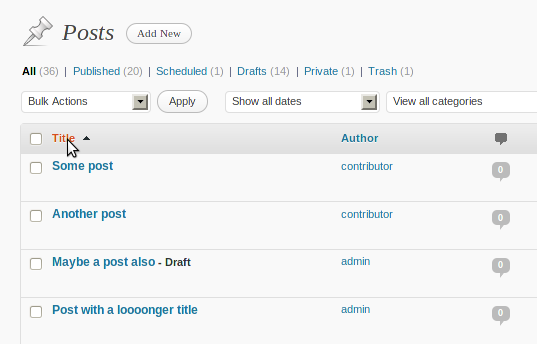
Sortable post columns

That’s all very nice, you say, but how do I make sortable columns of my own? First, let’s make a plain, old, non-sortable column:

// Register the column
function price_column_register( $columns ) {
	$columns['price'] = __( 'Price', 'my-plugin' );
 
	return $columns;
}
add_filter( 'manage_edit-post_columns', 'price_column_register' );

Nothing new here. We’re just using a well-known hook to add a Price column on the posts screen. Then, with another hook, we’re displaying the value, which is stored in a custom field in this case:

// Display the column content
function price_column_display( $column_name, $post_id ) {
	if ( 'price' != $column_name )
		return;
 
	$price = get_post_meta($post_id, 'price', true);
	if ( !$price )
		$price = '<em>' . __( 'undefined', 'my-plugin' ) . '</em>';
 
	echo $price;
}
add_action( 'manage_posts_custom_column', 'price_column_display', 10, 2 );

Now comes the interesting part:

// Register the column as sortable
function price_column_register_sortable( $columns ) {
	$columns['price'] = 'price';
 
	return $columns;
}
add_filter( 'manage_edit-post_sortable_columns', 'price_column_register_sortable' );

We first need to tell WordPress that this is a sortable column. As you can see, the hook name is very similar to the one we used to register the column in the first place. 1

There’s just one more thing we need to do. Since WordPress doesn’t know how to handle ‘orderby=price’, we’ll have to teach it, by altering the query variables:

function price_column_orderby( $vars ) {
	if ( isset( $vars['orderby'] ) && 'price' == $vars['orderby'] ) {
		$vars = array_merge( $vars, array(
			'meta_key' => 'price',
			'orderby' => 'meta_value_num'
		) );
	}
 
	return $vars;
}
add_filter( 'request', 'price_column_orderby' );

We’re basically telling it to order by the ‘price’custom field we displayed before. 2

And that’s all there is to it. This is how it should look:
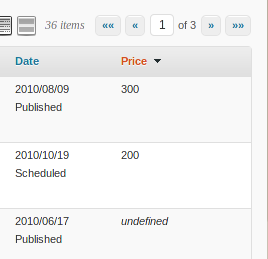
Result

Here’s the full code, for convenience: https://gist.github.com/906872

Update: With the CodePress Admin Columns plugin you can manage admin columns through a GUI.

Notes:

  1. The first ‘price’represents the internal column name, while the second is the value sent to the ?orderby= query variable.
  2. More info on meta_value_num.

Reactions (3)

Comments (80)

  • Victor Teixeira says:

    Ok, but what if the price was a number like 1,402.95?

    How can the database sort it if this is not stored as a double or float?

  • Jamie says:

    Does this change apply for all custom post types as well?
    Would the hook be manage_edit-[posttypesingular]_sortable_columns ?

  • cotton says:

    can i easily add this functionality without having to upgrade to trunk, on production site?

    • scribu says:

      Unfortunately, no. A lot of code was refactored to make this possible, so you will have to wait until WordPress 3.1 is released.

  • Murph says:

    When using the manage_edit-post_columns hook to add a column to the $columns array, is there a best practice for positioning that column relative to the others?

    (I wish PHP’s array_push() had a second $pos argument so one could specify an index position.)

    Thanks very much for your blog and contributions to WordPress, scribu.

    • Murph says:

      I ended up implementing the following solution, but perhaps there’s something more elegant. Nonetheless, I want to share this in case anyone else needs to do something similar:


      $newcol = array_slice($columns, 0, 1);
      $newcol = array_merge($newcol, array('foto'=>'Foto'));
      $columns = array_merge($newcol, array_slice($columns, 1));
      return $columns;

  • Idealien says:

    For custom post types I use the manage_edit-[posttype]_columns filter to create anew the entire array in order I’d like to display it. Then use a switch / case on the particular elements that are not standard WP. There was a very thorough example of this somewhere online that escapes me now, but I’ve put up the meaningful parts in a code example at http://wordpress.pastebin.com/KaqLxMcF

  • Joe says:

    Good stuff.

    This article made me realize it’s time to get my custom meta data “start date”, to start storing data into a date object in the SQL. Right now they are VarChar, with the data saving as m/d/Y, so sorting columns are only sorting by month number.

    My question, is there a way to tell your SQL “teach” function to read the data as STRTOTIME? I’m aware this is not efficient, but it’s going to take me some time to convert my site structure to use proper datefields so i’d like to have a temporary fix.

  • Justin says:

    I know it’s probably not a super common use case, but is there any filter in place by which a plugin could disable AJAX sorting on their CPT admin page?

    • scribu says:

      Columns are non-sortable by default. So, if you don’t want sorting, just don’t do anything. :)

      • Justin says:

        Cool! That’s true for custom columns, but for what I want, it should work just to unset $columns["date" / "title"] in the sortable column name function. Thanks for the quick reply!

  • Joe says:

    Anyone confirm this method is working fine in RC2?

    • Joe says:

      Everything is fine in 3.1 RC2 except that If the custom post type is registered as ‘hierarchical’=> true, then the column will not populate with the data.

  • scribu,

    This one little feature I was really hoping would make it to 3.1 – good information as always, thanks for sharing! Also, GREAT work on helping to make multiple taxonomy queries possible in 3.1 :)

    So, I’m using Justin Tadlock’s awesome Entry Views extension to store view counts in a custom field, and I’d really love to be able to sort my various post types by view count!

    But I can’t seem to get things working properly…as soon as I click the “Views” column name to do some sorting, all the posts disappear.

    The URI then has “orderby=Views” in it…is there an easy way to add more parameters to the query? i.e. “meta_key=Views&orderby=meta_value_num”?

    According to Justin’s examples, those are the parameters he uses to sort the data…please, pardon my noob dev skills.

    //Frankie

    • scribu says:

      You can use the ‘request’filter to add the parameters:

      function my_alter_request( $vars ) {
        if ( isset( $vars['orderby'] ) && 'Views' == $vars['orderby'] ) {
          $vars = array_merge( $vars, array(
            'meta_key' => 'Views',
            'orderby' => 'meta_value_num'
          ) );
        }
       
        return $vars;
      }
      add_filter( 'request', 'my_alter_request' );

      I’ll update the example.

  • John Kolbert says:

    Can you add a default sorted column? Such as if you wanted the posts sorted by price by default rather then the order by which they were posted?

    • scribu says:

      You can use the ‘request’filter again:

      function my_default_orderby( $vars ) {
        $screen = get_current_screen();
       
        if ( 'edit' == $screen->base && 'my_ptype' == $screen->post_type ) {
          if ( !isset( $vars['orderby'] ) ) {
            $vars['orderby'] = 'price';
          }
        }
       
        return $vars;
      }
      if ( is_admin() )
      	add_filter( 'request', 'my_default_orderby' );
  • John Kolbert says:

    Works great! I added ‘order’=> ‘asc’to the array_merge for the default_orderby. Thanks so much for this great write up!

  • goto10 says:

    This is a fantastic feature to have in the WP core. Thanks for your hard work! Prior to this, I was pulling off something similar using tablesorter, a javascript solution. Of course, a core solution is much more desirable.

    I have run into a scenario with the WP implementation where I have not been able to get sorting to work properly.

    I have a custom post type which uses a custom taxonomy. I’m imposing a limit of a single term to each post (using a custom meta box drop down on the edit post screen for the CPT). The term for the taxonomy is assigned using the standard wp_set_object_terms() function. How can I make the taxonomy column sortable?

    A few more details…I’m not storing my columns in a meta key. The columns that I’m trying to sort are stored as term IDs. I’m getting the name of the columns using get_the_terms(). Therefore, the {name}_column_orderby function will not work for me.

  • gweedo says:

    Wow… Fantastic addition and writeup. Was very easily able to write a plug-in off this for a custom jobbie we’re doing.

    Thanks for posting this!

  • Greg Kerstin says:

    When I start sorting by custom taxonomy using your demo, I only am able to view 6 entries. Is there a way to include more entries?
    Thank you for the help, I stumbled on your site since 3.1 came out today.

    • scribu says:

      I think you’re confusing sorting with filtering. Sorting by a custom taxonomy would require some custom SQL, not provided in my example.

  • Olaf says:

    Hi scribu,

    great tutorial, just a small addition for people like me that would like the columns to be sortable in pages and custom post types as well.

    // Register the column as sortable
    function price_column_register_sortable( $columns ) {
    $columns['price'] = ‘price’;

    return $columns;
    }
    add_filter( ‘manage_edit-post_sortable_columns’, ‘price_column_register_sortable’);
    add_filter( ‘manage_edit-page_sortable_columns’, ‘price_column_register_sortable’);

    add_action(‘wp’, ‘add_sortable_price_for_custom_post_types’);

    function add_sortable_price_for_custom_post_types(){
    $args=array(
    ‘public’ => true,
    ‘_builtin’=> false
    );
    $post_types=get_post_types($args);
    foreach ($post_types as $post_type ) {
    add_filter( ‘manage_edit-’.$post_type.’_sortable_columns’, ‘price_column_register_sortable’);
    }
    }

    cheers,
    olaf

  • Amazing – just what I was looking for! Now I can order an ‘events’custom post type by date!

    Is there a way to filter the the admin to only display events that have yet to occur? Maybe by comparing the value of the stored date to the current time? Might one even be able to switch views so as to view past AND future events with some kind of toggle switch?! Wish I had the skills to solve this myself..!

  • sebastien says:

    Great post !

    I have a custom post_type “product” and a taxonomy for this post_type. This taxonomy is “color”.
    What can i sort the posts by color (alphabetical order) ?
    (i take this question because “color” is not a meta_key but a taxonomy)
    Thanks.

  • sebastien says:

    I use this code

    function color_column_register_sortable( $columns ) {
    $columns['column_name'] = "color";

    return $columns;
    }
    add_filter( 'manage_edit-product_sortable_columns', 'color_column_register_sortable' );

    my custom_post_type is : product
    my taxonomy is : color

    with this code, at the top of my column color the word “color” is clikable but the result is unordered and the url is : /wp-admin/edit.php?post_type=business&orderby=color&order=desc

    i must add the function color_column_orderby( $vars ) but i don’t know how…

  • Marco says:

    Hey Scribu,

    Having some difficulty getting it to work with my existing custom columns, not sure what I’m missing or doing wrong. See Below:

    add_action("manage_posts_custom_column",  "listing_custom_columns");
    add_filter("manage_edit-listing_columns", "listing_edit_columns");
     
    function listing_edit_columns($columns){
      $columns = array(
        "cb" => "",
        "title" => "Property Lisitngs",
        "mls" => "Web ID#",
        "price" => "Price",
        "beds" => "Bedrooms",
        "location_level1" => "Neighborhood",
        "date" => "Last Updated",
      );
     
      return $columns;
    }
     
    // Register the column as sortable
    function price_column_register_sortable( $columns ) {
    	$columns['price'] = 'price';
     
    	return $columns;
    }
    add_filter( 'manage_edit-post_sortable_columns', 'price_column_register_sortable' );
     
    function price_column_orderby( $vars ) {
    	if ( isset( $vars['orderby'] ) && 'price' == $vars['orderby'] ) {
    		$vars = array_merge( $vars, array(
    			'meta_key' => 'price',
    			'orderby' => 'meta_value_num'
    		) );
    	}
     
    	return $vars;
    }
    add_filter( 'request', 'price_column_orderby' );
     
     
    function listing_custom_columns($column){
      global $post;
     
      switch ($column) {
          case "mls":
          $mls = get_post_meta($post->ID, "mls_value", true);
          echo $mls;
          break;
          case "price":
          $price = get_post_meta($post->ID, "price_value", true);
          echo $price;
          break;
          case "beds":
          $beds = get_post_meta($post->ID, "beds_value", true);
          echo $beds;
          break;
          case "location_level1":
          $location_level1 = get_post_meta($post->ID, "location_level1_value", true);
          echo $location_level1;
          break;
      }
    }
    • scribu says:

      What exactly isn’t working?

      Are you expecting the aditional columns to be sortable as well?

      If so, then you have to add them in price_column_register_sortable() and in price_column_orderby().

  • Marco says:

    Hey Scribu,

    I apologize, I should have been more detailed.

    The price isn’t sorting with what I have above.

    • scribu says:

      Does it work with the exact code in the post?

      • Marco says:

        I added it exactly as in the post (See below)

        Next to my price it says “undefined”

        // Register the column
        function price_column_register( $columns ) {
        	$columns['price'] = __( 'Price', 'my-plugin' );
         
        	return $columns;
        }
        add_filter( 'manage_edit-post_columns', 'price_column_register' );
         
        // Display the column content
        function price_column_display( $column_name, $post_id ) {
        	if ( 'price' != $column_name )
        		return;
         
        	$price = get_post_meta($post_id, 'price', true);
        	if ( !$price )
        		$price = '<em>' . __( 'undefined', 'my-plugin' ) . '</em>';
         
        	echo $price;
        }
        add_action( 'manage_posts_custom_column', 'price_column_display', 10, 2 );
         
        // Register the column as sortable
        function price_column_register_sortable( $columns ) {
        	$columns['price'] = 'price';
         
        	return $columns;
        }
        add_filter( 'manage_edit-post_sortable_columns', 'price_column_register_sortable' );
         
        function price_column_orderby( $vars ) {
        	if ( isset( $vars['orderby'] ) && 'price' == $vars['orderby'] ) {
        		$vars = array_merge( $vars, array(
        			'meta_key' => 'price',
        			'orderby' => 'meta_value_num'
        		) );
        	}
         
        	return $vars;
        }
        add_filter( 'request', 'price_column_orderby' );
        • scribu says:

          Then that means you don’t actually have ‘price’custom fields attached to those posts (or it’s set to 0, which I now see is a bug in my code).

          • Marco says:

            Huh, but the price appears in my column.

            I have:

            “price” => array(
            “name” => “price”,
            “type” => “input”,
            “std” => “”,
            “title” => “Price (Required)”,

            If it’s a bug what would I need to change?

            • scribu says:

              ‘Next to my price it says “undefined”‘

              “Huh, but the price appears in my column.”

              Well does it appear or doesn’t it?

              Also, I don’t know what the last block of code you pasted represents.

              If, rather than the default metabox, you’re using a plugin to add custom field values, I suggest you ask the plugin author.

              • Marco says:

                The price does show in the column and the word “undefined” appears next to the price. I’m not using a plugin, forget the last block of code.

                • scribu says:

                  That’s probably caused by the code you originally had.

                  The important question is: is it sorting properly?

                  Anyway, it works for me, using this: https://gist.github.com/906872

                  I noticed though that posts without a ‘price’custom field aren’t displayed at all, when sorting by price.

  • rmlumley says:

    For the final function, how would I amend it so that it would show pages that don’t have a value assigned yet for that particular metabox? Right now, it’s only sorting the pages that have that value – I want to also see the pages that haven’t yet been assigned a value.

  • Kurt says:

    How can I sort by multiple custom fields? Like order by event_type then event_date…

  • Huroman says:

    This is completly insane. It works really good. Thank you for share it!

  • Michael says:

    Hi, thanks a lot, just got recommended to this page – It works like a charm. This will safe me lots of time – and it took me not even 5 min to implement :)

  • RdB says:

    Great Example! Thanks a lot. It seems I just can’t get my problem solved.

    You inspired me to create a new post admin table, leaving only the Title in place.

    I create five new columns; Leverancier, Artikel, Omschrijving, Bestelcode and Prijs. I register them as sortable.

    Now the strange thing: the columns sort, but it looks like they are sorting on a value that is not displayed. So something is happening, the URL changes to edit.php?orderby=artikel&order=asc, the columns are sorted, but not in the way I expect them to sort. :confused:

    Thanx for your reply.

    // Add the hooks to your theme or plugin initialization function.
    add_filter('manage_edit-post_columns', 'add_customized_column');
    add_action('manage_posts_custom_column', 'manage_attachment_customized_column',10,2);
    add_filter( 'manage_edit-post_sortable_columns', 'customized_column_register_sortable' );
     
    // Once we have added the hooks, we define the add_customized_column filter function. 
    // This function will allow us to add new columns or delete existing columns.
    function add_customized_column($posts_columns) {
        // Let's start by deleting an unneeded existing column
    	unset($posts_columns['author']);
    	unset($posts_columns['tags']);
    	unset($posts_columns['comments']);	
    	unset($posts_columns['date']);
    	// And now we add our new columns
    	$posts_columns['leverancier'] = __('Leverancier', 'column name');
    	$posts_columns['artikel'] = __('Artikel', 'column name');
    	$posts_columns['omschrijving'] = __('Omschrijving', 'column name');
    	$posts_columns['bestelcode'] = __('Bestelcode', 'column name');
    	$posts_columns['prijs'] = __('Prijs', 'column name');	
    	return $posts_columns;
    }
     
    //Next, we need to define what and how data is displayed for the new columns
    function manage_attachment_customized_column($column_name, $id) {
    	switch($column_name) {
    	case 'leverancier':
    		echo get_post_meta($id, 'post_product_supplier', $single = true);
    		break;
    	case 'artikel':
    		echo get_post_meta($id, 'post_product_article', $single = true);
    		break;
    	case 'omschrijving':
    		echo get_post_meta($id, 'post_product_description', $single = true);
    		break;
    	case 'bestelcode':
    		echo get_post_meta($id, 'post_product_articlenumber', $single = true);
    		break;
    	case 'prijs':		
    		echo get_post_meta($id, 'post_product_price', $single = true);
    		break;		
    	}
    }
     
    // Register the column as sortable
    function customized_column_register_sortable( $posts_columns) { 
    		$posts_columns['leverancier'] = 'leverancier' ;
    		$posts_columns['artikel'] = 'artikel';
    		$posts_columns['bestelcode'] = 'bestelcode';
    		$posts_columns['prijs'] = 'prijs' ; 	
    	return $posts_columns;
    }
     
    //alter the query
    function price_column_orderby( $vars ) {
      if ( isset( $vars['orderby'] ) && 'Leverancier' == $vars['orderby'] ) {
        $vars = array_merge( $vars, array(
          'meta_key' => 'leverancier',
          'orderby' => 'meta_value'
        ) );
      }
      elseif ( isset( $vars['orderby'] ) && 'Artikel' == $vars['orderby'] ) {
        $vars = array_merge( $vars, array(
          'meta_key' => 'artikel',
          'orderby' => 'meta_value'
        ) );
      }
      elseif ( isset( $vars['orderby'] ) && 'Bestelcode' == $vars['orderby'] ) {
        $vars = array_merge( $vars, array(
          'meta_key' => 'bestelcode',
          'orderby' => 'meta_value'
        ) );
      }
      elseif ( isset( $vars['orderby'] ) && 'Prijs' == $vars['orderby'] ) {
        $vars = array_merge( $vars, array(
          'meta_key' => 'prijs',
          'orderby' => 'meta_value_num'
        ) );
      }
      return $vars;
    }
    add_filter( 'request', 'price_column_orderby' );
    • scribu says:

      You said the url looks like ?orderby=artikel, yet you’re checking for ‘Artikel’, in price_column_orderby(). ‘Artikel’is not the same as ‘artikel’.

  • RdB says:

    Thanks for your reply! I removed all the capitals, now all posts disappear when I sort them. Here’s the new codesnippet. Any suggestions?

    /* NEW: CUSTOMIZING THE ADMIN COLUMNS */
    // Add the hooks to your theme or plugin initialization function.
    add_filter(‘manage_edit-post_columns’, ‘add_customized_column’);
    add_action(‘manage_posts_custom_column’, ‘manage_attachment_customized_column’,10,2);
    add_filter( ‘manage_edit-post_sortable_columns’, ‘customized_column_register_sortable’);

    // Once we have added the hooks, we define the add_customized_column filter function.
    // This function will allow us to add new columns or delete existing columns.
    function add_customized_column($posts_columns) {
    // Let’s start by deleting an unneeded existing column
    unset($posts_columns['author']);
    unset($posts_columns['tags']);
    unset($posts_columns['comments']);
    unset($posts_columns['date']);
    // And now we add our new columns
    $posts_columns['leverancier'] = __(‘leverancier’, ‘column name’);
    $posts_columns['artikel'] = __(‘artikel’, ‘column name’);
    $posts_columns['omschrijving'] = __(‘omschrijving’, ‘column name’);
    $posts_columns['bestelcode'] = __(‘bestelcode’, ‘column name’);
    $posts_columns['prijs'] = __(‘prijs’, ‘column name’);
    return $posts_columns;
    }

    //Next, we need to define what and how data is displayed for the new columns
    function manage_attachment_customized_column($column_name, $id) {
    switch($column_name) {
    case ‘leverancier’:
    echo get_post_meta($id, ‘post_product_supplier’, $single = true);
    break;
    case ‘artikel’:
    echo get_post_meta($id, ‘post_product_article’, $single = true);
    break;
    case ‘omschrijving’:
    echo get_post_meta($id, ‘post_product_description’, $single = true);
    break;
    case ‘bestelcode’:
    echo get_post_meta($id, ‘post_product_articlenumber’, $single = true);
    break;
    case ‘prijs’:
    echo get_post_meta($id, ‘post_product_price’, $single = true);
    break;
    }
    }

    // Register the column as sortable
    function customized_column_register_sortable( $posts_columns) {
    $posts_columns['leverancier'] = ‘leverancier’;
    $posts_columns['artikel'] = ‘artikel’;
    $posts_columns['bestelcode'] = ‘bestelcode’;
    $posts_columns['prijs'] = ‘prijs’;
    return $posts_columns;
    }

    //alter the query
    function price_column_orderby( $vars ) {
    if ( isset( $vars['orderby'] ) && ‘leverancier’== $vars['orderby'] ) {
    $vars = array_merge( $vars, array(
    ‘meta_key’=> ‘leverancier’,
    ‘orderby’=> ‘meta_value’
    ) );
    }
    elseif ( isset( $vars['orderby'] ) && ‘artikel’== $vars['orderby'] ) {
    $vars = array_merge( $vars, array(
    ‘meta_key’=> ‘artikel’,
    ‘orderby’=> ‘meta_value’
    ) );
    }
    elseif ( isset( $vars['orderby'] ) && ‘bestelcode’== $vars['orderby'] ) {
    $vars = array_merge( $vars, array(
    ‘meta_key’=> ‘bestelcode’,
    ‘orderby’=> ‘meta_value’
    ) );
    }
    elseif ( isset( $vars['orderby'] ) && ‘prijs’== $vars['orderby'] ) {
    $vars = array_merge( $vars, array(
    ‘meta_key’=> ‘prijs’,
    ‘orderby’=> ‘meta_value_num’
    ) );
    }
    return $vars;
    }
    add_filter( ‘request’, ‘price_column_orderby’);

    /* ———————————————-*/

  • ioian says:

    I have a couple of user meta fields that I am displaying on the USERS admin page. I am using the following code. It displays fine and I can click on the header to try and get it to sort, it just won’t do the sorting though. Can you point me in the right direction?

    //## USER ADMIN MODIFICATIONS ##
     
    // Register the column
    function additional_column_register( $columns ) {
    	$columns['manualcheck'] = __( 'Manual Check', 'my-plugin' );
    	$columns['datelastchecked'] = __( 'Date Last Checked', 'my-plugin' );
    	$columns['datenextcheck'] = __( 'Date Next Check', 'my-plugin' );
     
    	return $columns;
    }
    add_filter( 'manage_users_columns', 'additional_column_register' );
     
    // Display the column content
    function additional_column_display( $value, $column_name, $userID ) {
    	$value = get_the_author_meta($column_name,$userID);
    	if ( !$value )
    	{
    		$value = '<em>' . __( 'undefined', 'my-plugin' ) . '</em>';
    	} else {
    		switch ($column_name)
    		{
    		case 'datelastchecked':
    			$value = date("d M Y", strtotime($value));
    			break;
    		case 'datenextcheck':
    			$value = date("d M Y", strtotime($value));
    			break;
    		}
    	}
    	return $value;
    }
    add_action( 'manage_users_custom_column', 'additional_column_display', 10, 3 );
     
    // Register the column as sortable
    function additional_column_register_sortable( $columns ) {
    	$columns['datelastchecked'] = 'datelastchecked';
    	$columns['datenextcheck'] = 'datenextcheck';
    	return $columns;
    }
    add_filter( 'manage_users_sortable_columns', 'additional_column_register_sortable' );
     
    function additional_column_orderby( $vars ) {
    	if ( isset( $vars['orderby'] ) && 'datelastchecked' == $vars['orderby'] ) {
    		$vars = array_merge( $vars, array(
    			'meta_key' => 'datelastchecked',
    			'orderby' => 'meta_value_num'
    		) );
    	}
    	if ( isset( $vars['orderby'] ) && 'datenextcheck' == $vars['orderby'] ) {
    		$vars = array_merge( $vars, array(
    			'meta_key' => 'datenextcheck',
    			'orderby' => 'meta_value_num'
    		) );
    	} 
    	return $vars;
    }
    add_filter( 'request', 'additional_column_orderby' );
     
    //## END USER MODIFICATIONS ##
    • scribu says:

      Unfortunately, there is no 'orderby' => 'meta_value_num' for users, so you will have to muck with the SQL, using the ‘pre_user_query’action.

      • ioian says:

        OK thanks – can anyone help with a basic example of how I would use pre_user_query in this way?

  • RdB says:

    Ok, to ultimately test I copied your code without changing anything and the posts keep disappearing.

    The only thing I changed was
    $price = get_post_meta($post_id, ‘price’, true);
    to
    $price = get_post_meta($post_id, ‘post_product_price’, true);

    I run version 3.1.2. Am I really out of options?

    Thanks for your reply!

  • RdB says:

    I got the solution!
    The name of your custom field is important.
    This code ONLY works if the name of your custom field is EXACTLY same as the name of your custom column.

    To change the name of your custom fields you can use this SQL statement in phpmyadmin (first backup your database):

    UPDATE wp_postmeta SET meta_key=’new_value’WHERE meta_key=’old_value’;

    I earned some coffee now!

    Cheers!

  • Jeremy says:

    One user above was using an SQL query to sort by date because his date (m/d/y) was being sorted by month. I’m having a similar problem, but I don’t understand where the str_to_date() MySQL function should go? How can I do this? Anyone?

  • TS says:

    Hey Scribu,

    I’m using this to sort a date column, and the sorting works but it’s giving some odd results (2011-04-16, 2011-04-23, 2011-04-14, 2011-04-15). It’s always a little off, but the general directional idea is correct, ie months will be sorted correctly except in borderline cases (eg 04-02, 03-30, 04-05, 04-08).

    The date is stored in a standard custom field meta-value as YYYY/MM/DD.

    This is the sortgin code I took from the expample above and modified -

    `
    function datetime_start_column_orderby( $vars ) {
    if ( isset( $vars['orderby'] ) && ‘datetime_start’== $vars['orderby'] ) {

    $vars = array_merge( $vars, array(
    ‘meta_key’=> ‘_date_start’,
    ‘orderby’=> ‘meta_value_num’
    ));
    }

    return $vars;
    }
    add_filter( ‘request’, ‘datetime_start_column_orderby’);
    `

    I’m starting to wonder if this isn’t working because the meta-value is a string as opposed to a date. If so, where would I have to transform the variable? If not, what could be the reason for this weird problem?

    Thanks for a brief reply!

    • TS says:

      I solved this problem by changing

      ‘orderby’ => ‘meta_value_num’

      to

      ‘orderby’ => ‘meta_value’

      I figured that sorting for dates would be numerical sorting, but apparently it *only* works correctly when using “‘orderby’=> ‘meta-value’”, and not “‘orderby’=> ‘meta_value_num’”.

      • tz says:

        @TS — THANK YOU !!! I’ve been working on this all day.. easy to make my custom columns sortable, but the resulting sequence was WRONG.. it was not using ASC or DESC on the values of the column correctly. Finally got your post here.. which solved it for me. I wonder why it requires ‘orderby’ => ‘meta_value’, and why nobody else seemed to have this problem?

  • Brad says:

    I have a problem where my date field can be empty, so when sorting they actually disappear.

    How can I keep them from disappearing?

  • W says:

    @brad I’m having the same issue, did you solve it?

  • W says:

    *bump*

    ….I would like posts without data in the meta field I that I am sorting by to still show in the list.

  • Is it possible for this to work when the column name and custom field name are different? I have the following, but it does nothing (not even the arrow appears on the column)

    add_filter ("manage_edit-tf_events_columns", "tf_events_edit_columns");
    add_action ("manage_posts_custom_column", "tf_events_custom_columns");
    
    function tf_events_edit_columns($columns) {
    
        $columns = array(
            "cb" => "",
            "title" => "Event",
            "tf_col_ev_date" => "Dates",
            "tf_col_ev_times" => "Times",
            "tf_col_ev_cat" => "Category",
            "tf_col_ev_thumb" => "Thumbnail",
            "tf_col_ev_desc" => "Description",
            );
    
        return $columns;
    
    }
    
    function tf_events_custom_columns($column) {
    
        global $post;
        $custom = get_post_custom();
        switch ($column)
    
            {
                case "tf_col_ev_cat":
                    // - show taxonomy terms -
                    $eventcats = get_the_terms($post->ID, "tf_eventcategory");
                    $eventcats_html = array();
                    if ($eventcats) {
                        foreach ($eventcats as $eventcat)
                        array_push($eventcats_html, $eventcat->name);
                        echo implode($eventcats_html, ", ");
                    } else {
                    _e('None', 'themeforce');;
                    }
                break;
                case "tf_col_ev_date":
                    // - show dates -
                    $startd = $custom["tf_events_startdate"][0];
                    $endd = $custom["tf_events_enddate"][0];
                    $startdate = date("F j, Y", $startd);
                    $enddate = date("F j, Y", $endd);
                    echo $startdate . '' . $enddate . '';
                break;
                case "tf_col_ev_times":
                    // - show times -
                    $startt = $custom["tf_events_startdate"][0];
                    $endt = $custom["tf_events_enddate"][0];
                    $time_format = get_option('time_format');
                    $starttime = date($time_format, $startt);
                    $endtime = date($time_format, $endt);
                    echo $starttime . ' - ' .$endtime;
                break;
                case "tf_col_ev_thumb":
                    // - show thumb -
                    $post_image_id = get_post_thumbnail_id(get_the_ID());
                    if ($post_image_id) {
                        $thumbnail = wp_get_attachment_image_src( $post_image_id, 'post-thumbnail', false);
                        if ($thumbnail) (string)$thumbnail = $thumbnail[0];
                        echo '';
                    }
                break;
                case "tf_col_ev_desc";
                    the_excerpt();
                break;
    
            }
    }
    
    // Allow sorting by custom fields in Events backend
    
    	function event_date_column_register_sortable( $columns ) {
    	$columns['tf_col_ev_date'] = 'tf_col_ev_date';
    
    	return $columns;
    	}
    	add_filter( 'manage_edit-post_sortable_columns', 'event_date_column_register_sortable' );
    
    	function event_date_column_orderby( $vars ) {
    	if ( isset( $vars['orderby'] ) && 'tf_col_ev_date' == $vars['orderby'] ) {
    	    $vars = array_merge( $vars, array(
    	        'meta_key' => 'tf_events_startdate',
    	        'orderby' => 'meta_value'
    	    ) );
    	}
    
    	return $vars;
    	}
    	add_filter( 'request', 'event_date_column_orderby' );
    
    • scribu says:

      That’s because your filters are inconsistent:

      add_filter( 'manage_edit-tf_events_columns',

      vs.

      add_filter( 'manage_edit-post_sortable_columns',

      The second one should also be ‘tf_events’.

      • Making that change caused the column title to change to “tf_col_ev_date”– but still no arrow. I tried changing the instances of “tf_col_ev_date” to “Dates” in the last two functions.. but still no arrows.
        Thanks for your help

        • scribu says:

          It’s not possible for the column title to change by only making the modification I described. You probably also did something else.

          Tidy up your code and it will be easier to figure out what’s happening.

  • Shannon Antonio Black says:

    Shot :) this helped me alot

  • Steve says:

    I’m trying to add a last modified field to our Posts & Pages, which I’ve managed, and can click to sort, but as soon as I sort all of the entries disappear and return: No posts found.

    Code:

    // Register the column
    function revised_column_register( $columns ) {
        $columns['revised'] = 'Revised';
        return $columns;
    }
    
    add_filter( 'manage_edit-post_columns', 'revised_column_register' );
    
    // Display the column content
    function revised_column_display( $column_name, $id ) {
        if ('revised' == $column_name)
            echo get_post_field('post_modified', $id);
    }
    add_action( 'manage_posts_custom_column', 'revised_column_display', 10, 2 );
    
    // Register the column as sortable
    function revised_column_register_sortable( $columns ) {
    	$columns['revised'] = 'revised';
    
    	return $columns;
    }
    add_filter( 'manage_edit-post_sortable_columns', 'revised_column_register_sortable' );
    
    function revised_column_orderby( $vars ) {
    	if ( isset( $vars['orderby'] ) && 'revised' == $vars['orderby'] ) {
    		$vars = array_merge( $vars, array(
    			'meta_key' => 'revised',
    			'orderby' => 'meta_value'
    		) );
    	}
    
    	return $vars;
    }
    add_filter( 'request', 'revised_column_orderby' );
    
    • Steve says:

      Figured it out – need to change

      $vars = array_merge( $vars, array(
      ‘meta_key’=> ‘revised’,
      ‘orderby’=> ‘meta_value’

      TO:

      $vars = array_merge( $vars, array(
      ‘orderby’=> ‘revised’

      as post_modified is not a custom field.

    • scribu says:

      The trouble is that you’re telling WordPress to sort by a custom field called ‘revised’, instead of by the ‘post_modified’column. In this case, you don’t even need the revised_column_orderby() function.

      In revised_column_register_sortable() just replace:

      $columns['revised'] = 'revised';

      with

      $columns['revised'] = 'modified';
      • Steve says:

        Even simpler, and sorts a problem I was having with incorrect sorts too – thanks very much!

  • scribu says:

    Closing the comments now.

    For any further questions, I recommend WordPress Answers.